
- Posts: 74
Joomdle 2.x Installation
Problem with SSO
- Pierrick Le Brun
- Topic Author
- Offline
- Senior Member
-

Less
More
2 years 2 months ago #1
by Pierrick Le Brun
Problem with SSO was created by Pierrick Le Brun
Single Sign On is not working anymore.
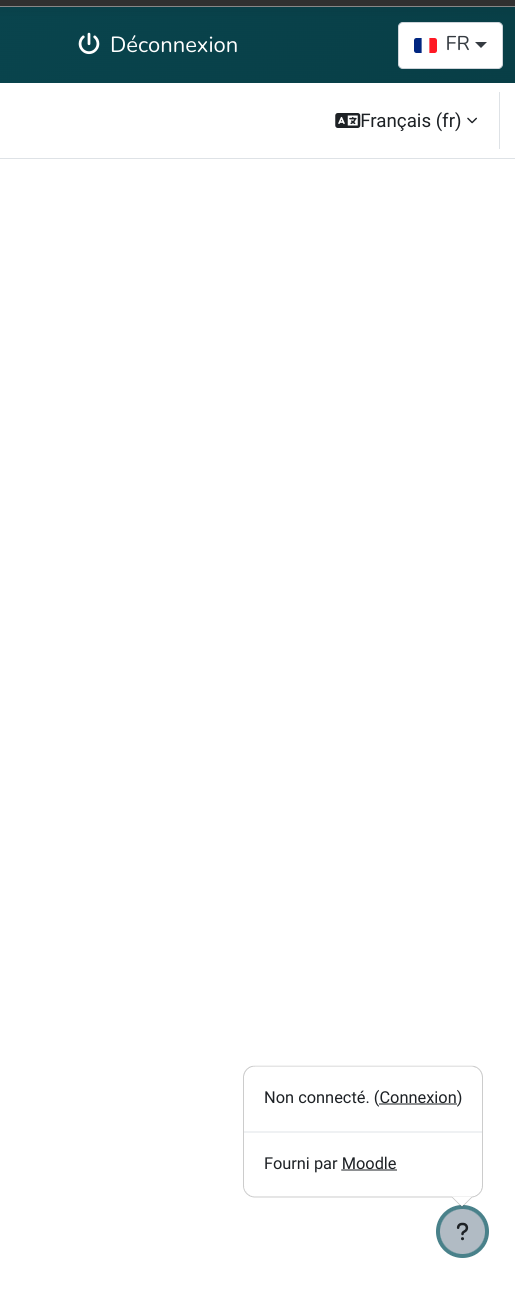
-> You can see on the screenshot that user is connected correctly on Joomla (top rignt status) while he is not connected in Moodle (bootom right status).
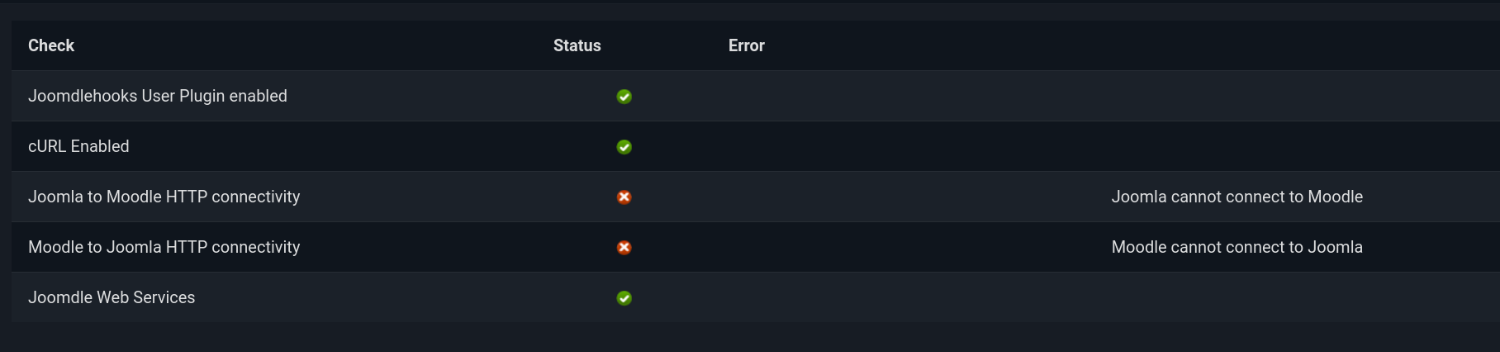
-> I also included a screenshot of Joomdle system check.
-> Content of administrator/logs/joomdle_system_check.json is :
-> You can see on the screenshot that user is connected correctly on Joomla (top rignt status) while he is not connected in Moodle (bootom right status).
-> I also included a screenshot of Joomdle system check.
-> Content of administrator/logs/joomdle_system_check.json is :
Code:
{"joomdle_auth":1,"mnet_auth":1,"joomdle_configured":1,"test_data":"It works","release":"2.3.1"}
Please Log in or Create an account to join the conversation.
- Pierrick Le Brun
- Topic Author
- Offline
- Senior Member
-
Less
More
- Posts: 74
2 years 2 months ago - 2 years 2 months ago #2
by Pierrick Le Brun
Replied by Pierrick Le Brun on topic Problem with SSO
For the moment I deactivated the Moodle login redirection to Joomla login so that users can at least login from the regular Moodle login page.
Last edit: 2 years 2 months ago by Pierrick Le Brun.
Please Log in or Create an account to join the conversation.
- Pierrick Le Brun
- Topic Author
- Offline
- Senior Member
-
Less
More
- Posts: 74
2 years 2 months ago #3
by Pierrick Le Brun
Replied by Pierrick Le Brun on topic Problem with SSO
In Moodle authentification plugins, I only have Joomdle and Manual Accounts activated... Should Web Services Authentication also be enabled ?
On the other hand, in "Administration/Advanced features/Enable web services" is enabled as it should.
On the other hand, in "Administration/Advanced features/Enable web services" is enabled as it should.
Please Log in or Create an account to join the conversation.
- Antonio Durán
-

- Offline
- Moderator
-

Less
More
- Posts: 7848
2 years 2 months ago #4
by Antonio Durán
Replied by Antonio Durán on topic Problem with SSO
Hi.
SSO problems can be caused by different things, so it's hard to tell from here.
How is your SSO config in Joomdle in Joomla? Are you using redirect-less SSO?
Are Joomla and Moodle on the same domain? (same subdomain)
Something might be preventing the execution of the land.php script. Try opening in the browser: MOODLE_SITE_URL/auth/joomdle/land.php
SSO problems can be caused by different things, so it's hard to tell from here.
How is your SSO config in Joomdle in Joomla? Are you using redirect-less SSO?
Are Joomla and Moodle on the same domain? (same subdomain)
Something might be preventing the execution of the land.php script. Try opening in the browser: MOODLE_SITE_URL/auth/joomdle/land.php
Please Log in or Create an account to join the conversation.
- Pierrick Le Brun
- Topic Author
- Offline
- Senior Member
-
Less
More
- Posts: 74
2 years 2 months ago #5
by Pierrick Le Brun
Replied by Pierrick Le Brun on topic Problem with SSO
Yes I'm using redirectless, and both Joomla and Moodle are on the same domain (moodle is in a Joomla directory)
MOODLE_SITE_URL/auth/joomdle/land.php gives me the following message:
MOODLE_SITE_URL/auth/joomdle/land.php gives me the following message:
Forbidden - You don't have permission to access this resource.
Please Log in or Create an account to join the conversation.
- Antonio Durán
-
- Offline
- Moderator
-
Less
More
- Posts: 7848
2 years 2 months ago #6
by Antonio Durán
Replied by Antonio Durán on topic Problem with SSO
That's probably the problem then. You'll need to check why your host is forbidding access to this file.
To confirm this is really the problem (and not a false positive caused by a redirect), you can edit that file, adding at the start of the PHP code:
echo "X"; exit ();
Then open it again in the browser to see if you get the same issue.
To confirm this is really the problem (and not a false positive caused by a redirect), you can edit that file, adding at the start of the PHP code:
echo "X"; exit ();
Then open it again in the browser to see if you get the same issue.
Please Log in or Create an account to join the conversation.
- Pierrick Le Brun
- Topic Author
- Offline
- Senior Member
-
Less
More
- Posts: 74
2 years 2 months ago #7
by Pierrick Le Brun
Replied by Pierrick Le Brun on topic Problem with SSO
Now message is:
X
X
Please Log in or Create an account to join the conversation.
- Antonio Durán
-
- Offline
- Moderator
-
Less
More
- Posts: 7848
2 years 2 months ago #8
by Antonio Durán
Replied by Antonio Durán on topic Problem with SSO
Then it was a false positive, and the message is not related to the issue. You can remove the debug now.
Double check that the Moodle Cookie Path is set correctly in your Joomdle configuration in Joomla.
You can try disabling redirect-less to see if that works. Even if you want t o enable it, testing this can give some insight on the problem.
Double check that the Moodle Cookie Path is set correctly in your Joomdle configuration in Joomla.
You can try disabling redirect-less to see if that works. Even if you want t o enable it, testing this can give some insight on the problem.
Please Log in or Create an account to join the conversation.
- Pierrick Le Brun
- Topic Author
- Offline
- Senior Member
-
Less
More
- Posts: 74
2 years 2 months ago #9
by Pierrick Le Brun
Replied by Pierrick Le Brun on topic Problem with SSO
Cookie path is set to the moodle directory
SSO is working correctly now once redirect-less has been disabled
SSO is working correctly now once redirect-less has been disabled
Please Log in or Create an account to join the conversation.
- Pierrick Le Brun
- Topic Author
- Offline
- Senior Member
-
Less
More
- Posts: 74
2 years 2 months ago #10
by Pierrick Le Brun
Replied by Pierrick Le Brun on topic Problem with SSO
cURL is enabled on my server.
But when I reactivate redirect-less , same problem... SSO doesn't work anymore.
But when I reactivate redirect-less , same problem... SSO doesn't work anymore.
Please Log in or Create an account to join the conversation.