
- Posts: 7
Joomdle 1.0 Installation
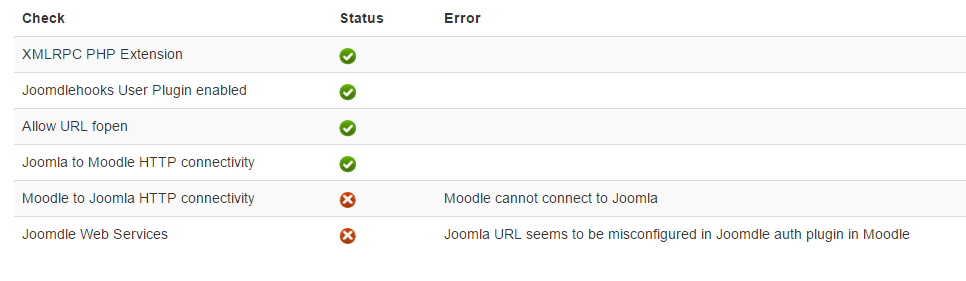
Joomla URL seems to be misconfigured --
- Jim Johnson
- Topic Author
- Offline
- New Member
-

Less
More
10 years 11 months ago - 10 years 11 months ago #1
by Jim Johnson
Joomla URL seems to be misconfigured -- was created by Jim Johnson
I have spent 6 hours trying to fix this; I am no novice to Joomdle either, been using it for 4+ years with many installations.
Joomla 3.4.1; Moodle 2.8 and Moodle 2.9 and latest Joomdle 1.0.1
If anybody wants to try; you can login: (Joomla)
invidasuccess.com/front/administrator
Username: admin Password: 12345
invidasuccess.com/online/ (Moodle)
Username: admin Password: 12345
It's just dummy websites I used to see if starting from scratch might make it work.....there is no identifying information there.
Joomla 3.4.1; Moodle 2.8 and Moodle 2.9 and latest Joomdle 1.0.1
- I have even tried brand new installs of Joomla, Moodle and Joomdle. I have tried Joomdle .095 and 1.0.
- I have tried leaving off www, adding it on, removing the trailing /, adding the trailing /
- I have rebuilt Apache twice with different settings.
- XMLRPC is enabled..
- invidasuccess.com/online/auth/joomdle/connection_test.php Comes back OK
If anybody wants to try; you can login: (Joomla)
invidasuccess.com/front/administrator
Username: admin Password: 12345
invidasuccess.com/online/ (Moodle)
Username: admin Password: 12345
It's just dummy websites I used to see if starting from scratch might make it work.....there is no identifying information there.
Last edit: 10 years 11 months ago by Jim Johnson.
Please Log in or Create an account to join the conversation.
- Jim Johnson
- Topic Author
- Offline
- New Member
-
Less
More
- Posts: 7
10 years 11 months ago - 10 years 11 months ago #2
by Jim Johnson
Replied by Jim Johnson on topic Joomla URL seems to be misconfigured --
Could this have anything to do with cloudflare? I think the problem started a few months back when I first enabled cloudflare. I guess I can try to explore that and disable cloudflare for a test.
It is so frustrating knowing that my moodle, joomla and joomdle setups are correct.
Edit:: Nope, not clloudflare. I changed the DNS back to my regular one and still having same problem.
It is so frustrating knowing that my moodle, joomla and joomdle setups are correct.
Edit:: Nope, not clloudflare. I changed the DNS back to my regular one and still having same problem.
Last edit: 10 years 11 months ago by Jim Johnson.
Please Log in or Create an account to join the conversation.
- Jim Johnson
- Topic Author
- Offline
- New Member
-
Less
More
- Posts: 7
10 years 11 months ago #3
by Jim Johnson
Replied by Jim Johnson on topic Joomla URL seems to be misconfigured --
Ended up with over 10 hours on this today, never figured it out.
Please Log in or Create an account to join the conversation.
- Antonio Durán
-

- Offline
- Moderator
-

Less
More
- Posts: 7848
10 years 11 months ago #4
by Antonio Durán
Replied by Antonio Durán on topic Joomla URL seems to be misconfigured --
Joomla URL seems to be misconfigured: This error means that the response from Joomla to Moodle is not good.
But you are also getting: Moodle cannot connect to Joomla.
I took a quick look, and Joomla URL was missing /front. That didn't make it work, though.
URL to check is: invidasuccess.com/front/components/com_j.../connection_test.php
This works fine from my browser.
But it seems it does not from your server: you shoud try from inside (for example using wget to fetch that URL from a ssh session)
But you are also getting: Moodle cannot connect to Joomla.
I took a quick look, and Joomla URL was missing /front. That didn't make it work, though.
URL to check is: invidasuccess.com/front/components/com_j.../connection_test.php
This works fine from my browser.
But it seems it does not from your server: you shoud try from inside (for example using wget to fetch that URL from a ssh session)
Please Log in or Create an account to join the conversation.
- Jim Johnson
- Topic Author
- Offline
- New Member
-
Less
More
- Posts: 7
10 years 11 months ago #5
by Jim Johnson
Replied by Jim Johnson on topic Joomla URL seems to be misconfigured --
Didn't seem to have a problem with wget.
I can't figure this out.

I can't figure this out.
Please Log in or Create an account to join the conversation.
- Antonio Durán
-
- Offline
- Moderator
-
Less
More
- Posts: 7848
10 years 11 months ago #6
by Antonio Durán
Replied by Antonio Durán on topic Joomla URL seems to be misconfigured --
That's strange... usually you get the same results using wget.
As this point I would go hard on debugging: try to capture packets with sniffer and try to find out what's happening to the Joomdle connection.
As this point I would go hard on debugging: try to capture packets with sniffer and try to find out what's happening to the Joomdle connection.
Please Log in or Create an account to join the conversation.
- Chris
-

- Offline
- Moderator
-
10 years 11 months ago #7
by Chris
Replied by Chris on topic Joomla URL seems to be misconfigured --
Being simplistic, you have been running this for 4 years therefore what has changed? It is likely that what the change was is probably linked to the problem.
Please Log in or Create an account to join the conversation.
- Jim Johnson
- Topic Author
- Offline
- New Member
-
Less
More
- Posts: 7
10 years 11 months ago - 10 years 11 months ago #8
by Jim Johnson
I want to thank everybody for trying to help us fix this.
Made a bunch of changes in March/April.
I was having random 500 errors with a new Apache build, wasn't sure what was causing them so I disabled quite a bit of options to try to troubleshoot. I didn't accurately track my changes since I was pressed for time to remove them.
I've made a temporary workaround to have a Joomdle implementation for our current application on our production site.
I made all of the immediately necessary Moodle courses a student needs as guest accessible, but disabled guest login in Moodle, so the flow looks like this:
I am not saying this is a Joomdle problem at all, it's likely a server configuration problem or even more likely an issue using Cloudflare; I posted here to make sure it wasn't anything I was doing incorrectly on the Joomdle/Moodle/Joomla end or if it was an issue with Joomla 3.4+ or Moodle 2.8+ since we don't update that often.
If I had unlimited amount of time I'd be able to track every piece of work we do and narrow down exactly what the problem was and fix it but we have more pressing matters right now and I'll likely circle back around to this in July or August.
I don't know what caused it, none of our other applications are having connection issues, but we also don't use XMLRPC for anything else.
Replied by Jim Johnson on topic Joomla URL seems to be misconfigured --
Chris wrote: Being simplistic, you have been running this for 4 years therefore what has changed? It is likely that what the change was is probably linked to the problem.
I want to thank everybody for trying to help us fix this.
Made a bunch of changes in March/April.
- Added Cloudflare
- Changed VPS ips/servers
- Upgraded to Moodle 2.8+
- Upgraded to Joomla 3.4+
- Tried a few different Apache builds
I was having random 500 errors with a new Apache build, wasn't sure what was causing them so I disabled quite a bit of options to try to troubleshoot. I didn't accurately track my changes since I was pressed for time to remove them.
I've made a temporary workaround to have a Joomdle implementation for our current application on our production site.
I made all of the immediately necessary Moodle courses a student needs as guest accessible, but disabled guest login in Moodle, so the flow looks like this:
- Joomdle/Hikashop creates the account
- They login to Moodle
- They go to edit profile page and update their information (because Moodle didn't correctly grab it from Joomla)
- They go back to their Moodle homepage and intro are guest accessible
- At 6:00am we run a script that takes new Moodle users, redefines their role to student and enrols them in the proper Moodle courses
I am not saying this is a Joomdle problem at all, it's likely a server configuration problem or even more likely an issue using Cloudflare; I posted here to make sure it wasn't anything I was doing incorrectly on the Joomdle/Moodle/Joomla end or if it was an issue with Joomla 3.4+ or Moodle 2.8+ since we don't update that often.
If I had unlimited amount of time I'd be able to track every piece of work we do and narrow down exactly what the problem was and fix it but we have more pressing matters right now and I'll likely circle back around to this in July or August.
I don't know what caused it, none of our other applications are having connection issues, but we also don't use XMLRPC for anything else.
Last edit: 10 years 11 months ago by Jim Johnson.
Please Log in or Create an account to join the conversation.
- Antonio Durán
-
- Offline
- Moderator
-
Less
More
- Posts: 7848
10 years 11 months ago #9
by Antonio Durán
Replied by Antonio Durán on topic Joomla URL seems to be misconfigured --
Hi Jim.
I am glad you have found a temp fix.
Just in case you want to track this further: it does not seem to be an XMLRPC problem, as the first check that fails does not use XMLRPC at all.
I checked your test site again, and system check pages quite slow. Maybe some DNS problem? Or maybe some routing problem trying to get things from cloudflare?
It does not make much sense to me, as this URL is loading fine:
invidasuccess.com/online/auth/joomdle/co...tion_test_joomla.php
This is the one that connects back to joomla. So connection to joomla is working fine, but somehow Joomla cannot get this file, although it get connection_test.php just fine in the same folder (this is the one responsible for first connection test, which is green).
Well I was testing around with system check and on one of them I got an internal server error. It seems you are still having random 500 errors, as I didn't make any real changes.
I am glad you have found a temp fix.
Just in case you want to track this further: it does not seem to be an XMLRPC problem, as the first check that fails does not use XMLRPC at all.
I checked your test site again, and system check pages quite slow. Maybe some DNS problem? Or maybe some routing problem trying to get things from cloudflare?
It does not make much sense to me, as this URL is loading fine:
invidasuccess.com/online/auth/joomdle/co...tion_test_joomla.php
This is the one that connects back to joomla. So connection to joomla is working fine, but somehow Joomla cannot get this file, although it get connection_test.php just fine in the same folder (this is the one responsible for first connection test, which is green).
Well I was testing around with system check and on one of them I got an internal server error. It seems you are still having random 500 errors, as I didn't make any real changes.
Please Log in or Create an account to join the conversation.
- Chris
-
- Offline
- Moderator
-
10 years 11 months ago - 10 years 11 months ago #10
by Chris
Replied by Chris on topic Joomla URL seems to be misconfigured --
I recognise that you tried removing cloudfare and wonder that when you went , if you really went back to 'normal' ie when working. Perhaps when you rolled back, you didn't roll back fully?
On cloudfare (or any CDN) - are you replicating static pages only? Did you implement the joomla cloudfare plugin? Have you setup the cloudfare pagerules? Have you limited the extensions to just jpg, png, css, etc. Try without js files. If this is not configured correctly, you will certainly have problems trying to cache dynamic content instead of just static. Also, there are quite a few URL redirection possibilities. Given that the error messages are URL related perhaps, cloudfare is trying / or not trying to redirect urls correctly.
I am not aware of the cloudfare configuration steps in detail as I use CDNify - I chose this CDN because the Joomla plugin takes care of which pages can be cached.
As for your other changes: VPS, Moodle, Joomla, Joomdle, these should not cause such problems unless you have not updated joomdle properly with your upgrades.
On cloudfare (or any CDN) - are you replicating static pages only? Did you implement the joomla cloudfare plugin? Have you setup the cloudfare pagerules? Have you limited the extensions to just jpg, png, css, etc. Try without js files. If this is not configured correctly, you will certainly have problems trying to cache dynamic content instead of just static. Also, there are quite a few URL redirection possibilities. Given that the error messages are URL related perhaps, cloudfare is trying / or not trying to redirect urls correctly.
I am not aware of the cloudfare configuration steps in detail as I use CDNify - I chose this CDN because the Joomla plugin takes care of which pages can be cached.
As for your other changes: VPS, Moodle, Joomla, Joomdle, these should not cause such problems unless you have not updated joomdle properly with your upgrades.
Last edit: 10 years 11 months ago by Chris.
Please Log in or Create an account to join the conversation.