
- Posts: 5
Joomdle 1.0 Installation
Moodle cannot connect to Joomla
- EMvanPelt
- Topic Author
- Offline
- New Member
-

Less
More
7 years 6 months ago #1
by EMvanPelt
Moodle cannot connect to Joomla was created by EMvanPelt
Can anyone help me with the last steps in connecting Moodle and Joomla.
My setup is:
Joomla version 3.9.2
sport-opleiding.nl
Moodle version 3.6.2
sport-opleiding.nl/educatie
Joomdle version 1.2.2
PHP Version 7.2.14
sport-opleiding.nl/index.php?option=com_...server&format=xmlrpc output = XML-RPC Error (1): Invalid token:
But the token in copy/pasted
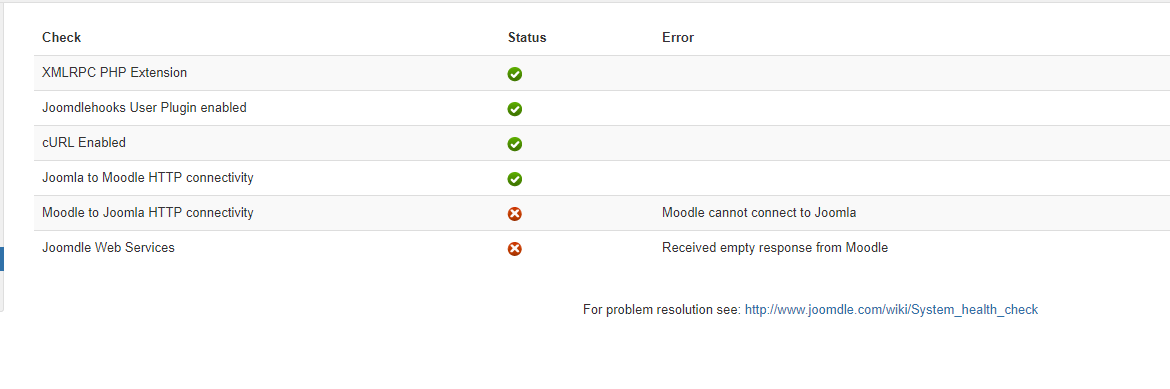
Joomdle Web Services = Received empty response from Moodle
I searched various forums but nothing helped. My hosting company is WebOke.
My setup is:
Joomla version 3.9.2
sport-opleiding.nl
Moodle version 3.6.2
sport-opleiding.nl/educatie
Joomdle version 1.2.2
PHP Version 7.2.14
sport-opleiding.nl/index.php?option=com_...server&format=xmlrpc output = XML-RPC Error (1): Invalid token:
But the token in copy/pasted
Joomdle Web Services = Received empty response from Moodle
I searched various forums but nothing helped. My hosting company is WebOke.
Please Log in or Create an account to join the conversation.
- Antonio Durán
-

- Offline
- Moderator
-

Less
More
- Posts: 7848
7 years 6 months ago #2
by Antonio Durán
Replied by Antonio Durán on topic Moodle cannot connect to Joomla
Hi.
Do you get any other red items in system check, aside the web services empty response?
Do you get any other red items in system check, aside the web services empty response?
Please Log in or Create an account to join the conversation.
- EMvanPelt
- Topic Author
- Offline
- New Member
-
Less
More
- Posts: 5
7 years 6 months ago #3
by EMvanPelt
Replied by EMvanPelt on topic Moodle cannot connect to Joomla
Every other is green checked. See screen below. I just update to Joomdle 1.2.3 in Joomla. But no extra green checks.
Please Log in or Create an account to join the conversation.
- Antonio Durán
-
- Offline
- Moderator
-
Less
More
- Posts: 7848
7 years 6 months ago #4
by Antonio Durán
Replied by Antonio Durán on topic Moodle cannot connect to Joomla
Ok, you can try this:
- Download www.joomdle.com/aux/joomdle_moodle_ws_client.php.zip and unzip
- Edit to add your site data
- Upload to your Joomla main folder and open it with the browser
- If Joomla and Moodle are on the same domain: If you get an empty reply above, upload file to a different server and open it with the browser. This way you can know if problem is only happening when the server connects to itself.
- Download www.joomdle.com/aux/joomdle_moodle_ws_client.php.zip and unzip
- Edit to add your site data
- Upload to your Joomla main folder and open it with the browser
- If Joomla and Moodle are on the same domain: If you get an empty reply above, upload file to a different server and open it with the browser. This way you can know if problem is only happening when the server connects to itself.
Please Log in or Create an account to join the conversation.
- EMvanPelt
- Topic Author
- Offline
- New Member
-
Less
More
- Posts: 5
7 years 6 months ago - 7 years 6 months ago #5
by EMvanPelt
Replied by EMvanPelt on topic Moodle cannot connect to Joomla
I placed the script and the outcome was twice:
Reply:
Is this good or bad?
Reply:
Is this good or bad?
Last edit: 7 years 6 months ago by EMvanPelt.
Please Log in or Create an account to join the conversation.
- EMvanPelt
- Topic Author
- Offline
- New Member
-
Less
More
- Posts: 5
7 years 6 months ago - 7 years 6 months ago #6
by EMvanPelt
Replied by EMvanPelt on topic Moodle cannot connect to Joomla
And some more screens
Last edit: 7 years 6 months ago by EMvanPelt.
Please Log in or Create an account to join the conversation.
- Antonio Durán
-
- Offline
- Moderator
-
Less
More
- Posts: 7848
7 years 6 months ago #7
by Antonio Durán
Replied by Antonio Durán on topic Moodle cannot connect to Joomla
Hi.
I did some testing with your data (you should delete the pics, as they give confidential info) and it seems there is some problem with your Moodle.
If I add print_r ($response); to the file, after the file_get_contents call, I should get the raw XML, but instead I am seeing the entire Moodle page, with an "undefined" message that I have never seen before.
First thing I would try is chaing Moodle theme and testing again, to see if it is related.
I did some testing with your data (you should delete the pics, as they give confidential info) and it seems there is some problem with your Moodle.
If I add print_r ($response); to the file, after the file_get_contents call, I should get the raw XML, but instead I am seeing the entire Moodle page, with an "undefined" message that I have never seen before.
First thing I would try is chaing Moodle theme and testing again, to see if it is related.
Please Log in or Create an account to join the conversation.
- EMvanPelt
- Topic Author
- Offline
- New Member
-
Less
More
- Posts: 5
7 years 6 months ago #8
by EMvanPelt
Replied by EMvanPelt on topic Moodle cannot connect to Joomla
I changed to the boost theme. But unfortunatly I got the same result.
Please Log in or Create an account to join the conversation.
- Antonio Durán
-
- Offline
- Moderator
-
Less
More
- Posts: 7848
7 years 6 months ago #9
by Antonio Durán
Replied by Antonio Durán on topic Moodle cannot connect to Joomla
Then problem must be caused by something else... although I don't know what, as I have never seen a similar error.
Try enabling debugging in Moodle to see if you can get more info, although I don't think it will help.
At this point, I would just try to debug Moodle web services code to try to find out what's happening, although that's not so easy.
Try enabling debugging in Moodle to see if you can get more info, although I don't think it will help.
At this point, I would just try to debug Moodle web services code to try to find out what's happening, although that's not so easy.
Please Log in or Create an account to join the conversation.